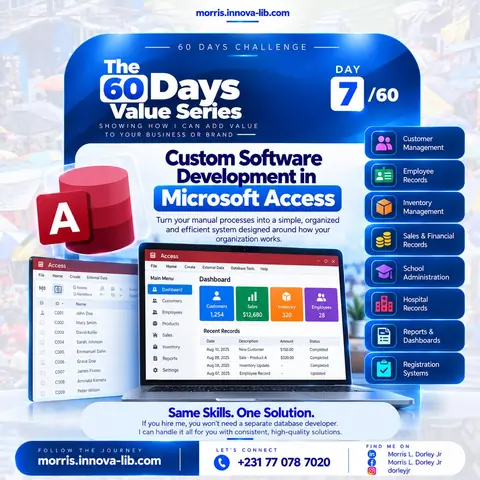

Day 7 of the 60 Days Value Series is about turning manual work into a system. If you hire me, you will not need a separate database developer. I build custom software in Microsoft Access that turns your notebooks, paper files and scattered spreadsheets into one simple, organized and efficient system, designed around how your organization actually works.
Is your organization still running on paper and scattered files?
Walk into many offices, schools, clinics and shops and you will find the same picture. Customer names in one notebook. Staff files in a cabinet. Stock counted by hand at the end of the week. Sales written on loose pages and added up with a calculator. Every question takes time: how many items are left, who paid, which student has not registered, which patient came last month.
The information exists, but it is hard to find, easy to lose and almost impossible to summarize. This post is for owners, managers, school administrators, clinic staff and project leads who want a Microsoft Access developer in Liberia who can replace that manual effort with a working system, and who would rather deal with one person than with a designer, a programmer and a database specialist separately.

What is Microsoft Access and why does it still matter?
Microsoft Access is a database program from Microsoft. A database is simply an organized place to keep records so that you can add, find, change and summarize them quickly. In Access, information is stored in tables, entered through forms, searched through queries and presented through reports.
A good Access system does not look like a database at all. Your staff open a clean main menu with buttons such as Customers, Employees, Products, Sales, Inventory, Reports and Settings. They click a button, fill in a simple form and save. The system does the sorting, counting and searching behind the scenes.
Access matters in Liberia for practical reasons:
- It runs on an ordinary Windows computer. You do not need a server room or expensive equipment.
- It does not depend on a constant internet connection. Power cuts and weak connectivity are real challenges, and a system that works on the local computer keeps working.
- There is no monthly cloud subscription. You own the system instead of renting it.
- It is fast to build. A focused system can be designed, built and put to use much sooner than a large custom platform.
- It is easy to change. When a new need appears, a new field, screen or report can be added.
The best software is not the biggest or the most fashionable. It is the one your team actually uses every day because it fits the way they already work.
Why does custom software beat a generic tool?
Off the shelf programs are built for an average customer who does not exist. They come with features you never use and miss the ones you need. Staff end up working around the software instead of the software working for them. Custom software reverses that. I start by learning your process, then build the screens, the fields and the reports around it. If your school records have a particular format, or your shop tracks stock by a particular unit, the system reflects that.
It also removes a hidden cost: double entry. When customers, sales and inventory live in separate places, the same information is typed again and again, and mistakes creep in. In one connected system, a sale reduces stock, appears in the sales record and feeds the report without anyone typing it twice.
What eight systems does the Day 7 flyer cover?
The flyer lists eight common systems that organizations in Liberia and across Africa ask for. Here is what each one means in practice.
1. Customer management
A customer management system keeps every customer in one place: name, phone number, address, history of purchases or services, balances owed and notes. You can find a customer in seconds, see what they bought, follow up on unpaid amounts and list the customers you have not heard from in a while. Instead of flipping through a notebook, you search once and see everything.
2. Employee records
Staff information is often scattered across files and folders. An employee records system keeps personal details, job titles, departments, start dates, contact information and contract details together. It can store emergency contacts and track leave, and it can print a staff list or an individual file when needed. Your records stay organized, consistent and easy to update.
3. Inventory management
Inventory is where small mistakes become real losses. An inventory system records what you buy, what you sell and what is left in stock. It can show current quantities, flag items that are running low, and list stock movements by date. You stop guessing whether you have enough and stop discovering shortages when a customer is already at the counter.
4. Sales and financial records
A sales and financial records system captures each sale, payment, expense and balance as it happens. At the end of the day, week or month you get totals without sitting down with a calculator. You can see which products sell best, which customers still owe money, and how income compares with spending. It does not replace an accountant, but it gives you clean, organized figures to work with.
5. School administration
Schools handle a large amount of information: student profiles, class lists, guardians, attendance, fees paid and fees outstanding, grades and report cards. A school administration system brings these together. Registration becomes faster, class lists print in seconds, fee records stay accurate and report cards come from the same data the teachers already entered.
6. Hospital and clinic records
Health facilities need dependable records: patient registration, visit history, services provided, appointments and daily summaries. A records system makes it quick to find a patient, see previous visits and report on how many people were served. Because patient information is sensitive, I design the system so that access can be controlled, and I recommend that backups and permissions be handled carefully.
7. Reports and dashboards
Data is only useful when it answers questions. A dashboard shows the numbers that matter on one screen: total customers, sales for the period, stock levels, number of employees or students. Reports turn the same data into printable pages for managers, boards, donors or partners. When a funder or a manager asks for figures, you can produce them in minutes instead of days.
8. Registration systems
Events, training programs, schools, clubs and community organizations all register people. A registration system records each participant once, prevents duplicates, issues numbers or IDs, and lets you print lists, badges or attendance sheets. Whether you register fifty people or five thousand, the process stays organized.
How does a custom Access system work day to day?
Take a small shop as an example. A customer buys three items. The cashier selects the customer, picks the products and confirms the sale. The system records the sale, reduces the stock of each item, updates the customer history and adds the amount to the day's total. At closing time the manager opens the dashboard and sees sales, stock and outstanding balances without counting a single page.
A school works in a similar way. A new student is registered once. The record links to the class, the guardian, the fees and later the grades. Each term the same record produces the class list, the fee statement and the report card. Nothing is retyped, and nothing is lost between departments.
Why do many database projects fail?
Many organizations have tried to computerize before and gone back to paper. These are the usual reasons:
- The system was built without asking the users. It looks good but does not match the daily process, so staff avoid it.
- The screens are confusing. If people need a manual to enter a record, they will stop entering records.
- No one was trained. A system nobody knows how to use is just an icon on the desktop.
- The old data was never moved in. If the system starts empty and the paper keeps growing, the two never meet.
- There was no backup. One broken computer and the whole history is gone.
- The developer disappeared. When something needs to change, no one is there to change it.
I deal with each of these on purpose. I listen first, keep the screens simple, move your existing data in, train your staff, set up backups and stay available for changes.
How does having one person who does it all save you money?
A software project usually needs several skills: someone to understand the business, someone to design the database, someone to design the screens, someone to write the logic and someone to produce the reports and train the users. When these are separate people, you pay for the meetings between them and for every handoff where something is misunderstood.
- One conversation. You explain your process once to the person who will build it.
- No translation loss. The person who designs the database also designs the forms and reports, so they fit together.
- Faster changes. When you ask for a new report, I build it directly, with no chain of approvals.
- One bill. You deal with one person instead of coordinating a team.
- Consistent quality. The design, the data and the reports share the same standard because one person is responsible for all of them.
What if Access is not the right tool?
I will tell you honestly. Microsoft Access is excellent for a small team working on a local computer or an office network. It is not the right choice if you need dozens of people entering data at the same time, or if staff in different towns must reach the same records over the internet. In those cases I build a web based system on a database such as MySQL or PostgreSQL. I am a Cloud Architect and Full-Stack Developer with 90+ web applications built, so I can recommend the option that fits your size and budget instead of selling the only tool I know. My database development service page describes that side of the work.
What can a custom records system do for your organization?
I do not promise exact numbers, because every organization is different. These are the benefits a well built system can reasonably deliver:
- Less time spent searching because records are found in seconds.
- Fewer errors because information is entered once and checked by the system.
- Better control over stock, money and people because the current figures are always available.
- Faster reporting for managers, boards, donors and authorities.
- A safer record because the data is backed up instead of living in one notebook.
- A more professional image because customers, parents and patients are served quickly and accurately.
Who is this for?
- Shops and distributors that need to track stock, sales and customer balances.
- Schools and training centres that manage students, fees and results.
- Clinics and community health facilities that need organized patient and visit records.
- NGOs and projects that register beneficiaries and report to donors.
- Companies and offices that keep employee files and need quick staff reports.
- Event organizers and associations that register members and participants.
How do you know you need a custom system?
Here are signs that manual work is costing you more than you think:
- Finding one record means searching through several books or files.
- The same information is written in more than one place and the copies do not match.
- Month end reports take days to prepare and nobody trusts the totals.
- You are not sure how much stock you have until you count it.
- Only one person understands the spreadsheet, and everyone is afraid to touch it.
- A lost notebook or a broken computer would be a disaster.
What mistakes should you avoid when computerizing your records?
- Trying to build everything at once. Start with the most painful process, get it working, then add more.
- Skipping the old data. Plan how existing records will be cleaned and moved in.
- Letting everyone edit everything. Decide who can view, add and change records.
- Ignoring backups. Copy the database to a safe second location on a regular schedule.
- Forgetting training. Budget time to teach the people who will use the system every day.
- Choosing by price alone. The cheapest system that nobody uses is the most expensive one.
How should you prepare your records for a new system?
- List what you track today. Write down every notebook, file and spreadsheet that holds information.
- Note the questions you need answered. For example: who owes us money, what is low in stock, how many students paid this term.
- Collect sample records and forms. Bring the registration forms, receipts or report formats you already use.
- Decide who will use the system. Different roles need different screens and different permissions.
- Pick a backup habit. Choose how often and where copies will be saved.
What affects the price of custom software?
Every organization is different, so I price the work to the scope instead of quoting one fixed fee. These things shape the price:
- How many types of records the system must track.
- How many screens, forms and reports you need.
- How much existing data must be cleaned and imported.
- How many people will use it and what permissions they need.
- How much training and support you want after delivery.
Send me your goals and I will reply with a clear quote.
Where does my background fit in?
Custom software combines design, data and clear thinking about process. I am a Cloud Architect and Full-Stack Developer with 90+ web applications built, and I also work as a graphic designer, video editor, social media manager and SEO and lead generation specialist. That mix means your system is well structured behind the scenes and clear and attractive on the screen. See my skills, read about my experience, browse the case studies and learn more about me. You can also see my live work on the projects page and the full list on the services page.
How does it work?
- Send your brief. Tell me about your organization, what you track today and what is not working.
- Get a plan and a quote. I review your process and send a clear scope, timeline and price.
- I design and build. I create the tables, forms, menus and reports, and share progress so you can correct course early.
- We move your data in. I clean and import your existing records so the system starts with real information.
- Training and handover. I teach your staff, set up backups and stay available for changes.
Which search terms does this post answer?
If you arrived here from Google, you may have searched for one of these: Microsoft Access developer Liberia, custom software development Liberia, database developer in Monrovia, inventory management system for a shop in Liberia, school management system Liberia, hospital or clinic records system Liberia, registration system for events in Liberia, business software for African companies, or how to move from paper records to a database. The answer to all of them is the same: send me your brief and I will give you a clear plan and quote.
Ready to replace manual work with a system that fits you?
You do not need a database developer, a screen designer, a report writer and a trainer working separately. Message me on WhatsApp at +231 770 787 020 or visit the contact page, tell me how your organization works, and I will respond with the next step. Same skills, one solution, with consistent, high quality work you can see and use every day.
Tomorrow, Day 8 continues the series. Follow the journey on the blog, Facebook, Instagram and LinkedIn.
Frequently asked questions
What is Microsoft Access?
Microsoft Access is a database program from Microsoft. It lets you store records in organized tables, enter data through simple forms, search and filter quickly, and produce printed or on-screen reports. A developer can turn it into a custom application with menus, buttons and dashboards, so your staff use a clean screen instead of raw tables.
What does a Microsoft Access developer do?
A Microsoft Access developer studies how your organization handles information, designs the tables that store it, builds the forms people use to enter it, writes the queries that answer your questions and creates the reports you print or share. I do all of these steps myself, from the first conversation to training your staff.
What kinds of systems can you build in Microsoft Access?
The Day 7 flyer lists eight common ones: customer management, employee records, inventory management, sales and financial records, school administration, hospital or clinic records, reports and dashboards, and registration systems. If your task is something else that involves keeping and using records, send me the details and I will tell you honestly whether Access fits.
Is Microsoft Access a good choice for a business in Liberia?
For many small and medium organizations, yes. It runs on a normal Windows computer, does not need a constant internet connection, and does not need a monthly cloud subscription. That matters where connectivity and budgets are limited. It works best for a small team on a local computer or office network. For many users at once, or access from anywhere, a web based system is the better choice, and I can build that too.
Can my staff use it without computer training?
Yes. I design the screens around the way your staff already work, with clear menus and buttons, and I show your team how to use the system. People should not need to understand databases to use it.
Can you move my paper records or Excel sheets into the new system?
Yes. Many organizations start with notebooks, paper files or spreadsheets. I clean and organize that information and import it, so you do not have to retype everything by hand.
How much does custom software in Microsoft Access cost in Liberia?
The price depends on how many things the system must track, how many screens and reports you need, and how much existing data must be moved in. Send your details on WhatsApp at +231 770 787 020 and I will give you a clear quote for the exact scope.
Can the system be changed later?
Yes. Organizations change, so the system should too. I build it in a clear structure, which makes it easier to add a new report, a new field or a new screen when your needs grow.
Do you work with organizations outside Monrovia and outside Liberia?
Yes. I work with clients in Monrovia, across Liberia and across Africa, remotely or in person.