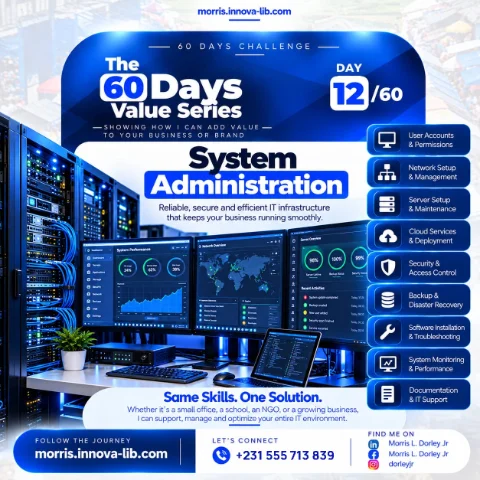

Day 12 of the 60 Days Value Series is about system administration. If you hire me, you will not need a separate system administrator. I build and run reliable, secure and efficient IT infrastructure that keeps your business running smoothly, from the first user account to the last backup, and I support it after it is set up.
What happens to your business when the systems stop?
Picture a normal Monday morning in Monrovia. The internet in the office is down, two staff members cannot sign in, the shared folder with this month's reports is missing, and the one computer that holds the accounts has a strange warning on the screen. Nobody knows who set up the router, nobody knows the admin password, and the last person who "fixed the computers" is not answering the phone. Work stops, customers wait and money is lost.
This happens in offices, schools and organizations across Liberia and Africa every week. Not because people are careless, but because nobody owns the IT environment. System administration is the work of owning it: planning it, setting it up properly, protecting it, watching it and fixing it before small faults turn into big outages.
This post is for business owners, school leaders, NGO managers and office administrators who are asking, "Who should manage our computers, network and data?" If you are searching for a system administrator in Liberia or reliable IT support in Monrovia, this is for you.

What is system administration, in plain words?
A system administrator is the person responsible for the technology that everyone else depends on. When it is done well, nobody notices it. People sign in, files open, the Wi-Fi works, email arrives and data is safe. When it is done badly, or not at all, everybody notices.
In practice, the work covers several connected areas:
- People. Who can use which systems, and what each person is allowed to see and change.
- Connections. The network, the internet link, the Wi-Fi and the devices on it.
- Machines. Servers, computers and the software running on them.
- The cloud. Email, file storage, hosted applications and websites that live online.
- Protection. Security controls, updates and backups that keep data safe.
- Visibility. Monitoring, records and documentation, so problems are seen early and solved quickly.
Large companies often split these areas between a network engineer, a server administrator, a cloud engineer, a security officer and a help desk. Most small and growing organizations in Liberia cannot afford five people, and they should not have to. One capable person who understands every layer can design them to work together.
Good IT is invisible. Your team should think about their work, not about whether the network, the passwords or the backups will hold today.
What nine services does the Day 12 flyer cover?
The flyer lists nine parts of the system administration service. Here is what each one means for your organization.
1. User accounts and permissions
Every staff member should have their own account, not a shared password written on a sticky note. I create and manage accounts, group people by role and give each role only the access it needs. The accountant sees the finance folder, the teacher sees the class records, and the intern does not see the payroll. When someone joins, they are productive on day one. When someone leaves, their access is removed the same day, which is one of the simplest and most important security steps an organization can take.
2. Network setup and management
A slow or unstable network wastes hours every week. I plan and configure the network: the router, switches, cabling and Wi-Fi, with separate access for staff and guests so visitors never touch your internal systems. I place access points where coverage is needed, set sensible addresses for printers and shared devices, and manage the network after setup so it stays stable as you add people and devices.
3. Server setup and maintenance
Many organizations need a central place for files, applications or databases. I set up servers correctly from the start, with the right operating system, storage, user access and updates, and I maintain them so they do not slowly become unreliable. My background in operating systems and virtualization means one physical machine can often run several services safely, which saves hardware cost.
4. Cloud services and deployment
Not everything belongs in a cabinet in your office. Email, shared documents, websites and many business applications are often cheaper and more reliable in the cloud. I set up and deploy cloud services and connect them to your office systems. As a Cloud Architect, I led an AWS cloud migration that cut operating cost by 90%, and I have kept services running at 99.9% uptime, so I can advise honestly on what should move to the cloud and what should stay local. You can read more on my cloud computing solutions page.
5. Security and access control
Security is not one product. It is a set of habits and controls: strong sign-in, updated systems, protection against malware, firewalls on the network, careful control of administrator rights and clear rules for sensitive data. I put these controls in place and explain them to your team in simple terms, because many problems start with a click on the wrong link. The cybersecurity consulting page gives more detail.
6. Backup and disaster recovery
Drives fail. Laptops are stolen. Power surges damage equipment, and viruses lock files. The question is not whether something will go wrong but how quickly you can recover. I set up automatic backups with copies kept in more than one place, including off-site or in the cloud, and I test that a restore actually works. A backup that has never been tested is only a hope. A disaster recovery plan answers the practical question: if this machine dies today, how do we work tomorrow?
7. Software installation and troubleshooting
Your team needs the right software installed, licensed, updated and working. I install and configure applications, fix errors, remove unwanted programs and solve the everyday problems that interrupt work: the printer that will not print, the program that will not open, the computer that has become slow. Each fix is recorded, so repeated problems are solved at the root and not only patched.
8. System monitoring and performance
The flyer shows dashboards with server uptime, backup status, security scans, CPU and memory usage and a list of recent activities. That is what monitoring looks like in practice. Instead of waiting for someone to complain, I watch the health of servers, storage, backups and the network, so a disk that is nearly full or a backup that failed last night is noticed and fixed before it causes an outage.
9. Documentation and IT support
Many organizations depend on one person's memory. When that person leaves, nobody knows the passwords, the network layout or how the server was configured. I document your environment: what equipment you have, how it is connected, who has access, where the backups are and how to recover. You own that documentation. Together with ongoing support, it means your IT does not disappear when one person does.
Who is this service for?
The flyer says it directly: whether it is a small office, a school, an NGO or a growing business, I can support, manage and optimize your entire IT environment. Here is what that looks like for each one.
- Small offices. Reliable Wi-Fi, individual accounts, shared files that are backed up, working printers and someone to call when something breaks.
- Schools and universities. Staff and student accounts, computer labs, a stable campus network, protected student records and systems that support learning. My work on the Starz University app, which serves 15,000+ students and faculty, is covered in the Starz University case study.
- NGOs. Secure handling of beneficiary and donor data, field staff who work remotely, cloud tools that connect several offices and documentation that satisfies audits and partners.
- Growing businesses. An IT setup that can grow from five people to fifty without being rebuilt, with clear permissions, central management and cost under control.
Why do IT problems keep coming back in many organizations?
- Nobody owns the environment. Different people fix different things, and nobody sees the whole picture.
- Shared passwords. Everyone uses the same login, so nobody can tell who did what, and old staff still have access.
- No backups, or untested backups. The organization only learns the truth on the day it loses data.
- Unmanaged networks. Guests, staff and devices all share one network with the default router password.
- Outdated software. Updates are skipped, leaving known security holes open.
- No monitoring. Problems are discovered when work stops, not before.
- No documentation. Every fix starts from zero because nothing was written down.
Every item on this list is solved by ownership. That is what you get when you hire one person who is responsible for the whole environment.
How does one person who does it all save you money?
- One point of contact. You call one person for the network, the server, the cloud and the laptop, instead of several vendors who blame each other.
- Joined up design. Accounts, network, servers, cloud, security and backups are planned to work together, not added one at a time.
- Less downtime. Monitoring and maintenance prevent many outages, and every hour your team can work is an hour you are paying for anyway.
- Smarter spending. I recommend only the hardware, licences and cloud services you need, and I find costs you can cut. Cutting cloud operating cost by 90% in a previous migration came from exactly this kind of review.
- Lower risk. Tested backups and proper security reduce the chance of the expensive day when data is lost or systems are locked.
- Knowledge stays with you. Documentation means your environment is understood, even by the next person who works on it.
How does system administration connect to the rest of this series?
Every system in this series needs a solid foundation. The website from Day 9, the booking platform from Day 8, the susu management system from Day 10 and the mobile app from Day 11 all run on servers, databases and networks that must be secure, backed up and monitored. Because I build applications and also run the infrastructure under them, I can take a project from the first line of code to a stable, supported system in production. That is the difference between an app that works in a demo and an app that works every day for real users.
What technical foundation is behind the work?
I am a Cloud Architect and Full-Stack Developer with 4+ years of experience, 24 projects delivered and 90+ web applications built. My work covers cloud platforms, infrastructure and DevOps, networking and security, operating systems and virtualization, and monitoring. You can explore each area on the skills pages for infrastructure and DevOps, networking and security, OS and virtualization and monitoring and analytics. The system admin and IT support and maintenance and support service pages describe how I work, and you can see more in my experience, projects and about pages.
How do you know your IT needs attention?
- Staff share one login or one password for important systems.
- You are not sure when the last backup ran, or whether it can be restored.
- The Wi-Fi is slow or drops, and guests use the same network as staff.
- Nobody can tell you the admin passwords for the router, the server or the email.
- Former staff may still have access to email or files.
- The same computer problems come back every few weeks.
- You pay for software or cloud services that you are not sure anyone uses.
If two or more of these sound familiar, your organization is carrying risk and cost that can be reduced.
What mistakes should you avoid when setting up IT?
- Buying equipment before planning. Decide what the systems must do, then choose the hardware.
- Leaving default settings. Default passwords and open settings are the first thing attackers try.
- Keeping all data on one machine. One failure should never mean losing everything.
- Giving everyone administrator rights. Convenience today becomes a security incident later.
- Ignoring power. In Liberia, stable power protection for key equipment is part of reliable IT.
- Treating IT as a one time job. Systems need updates, monitoring and care to stay healthy.
What affects the price of system administration and IT support?
Every environment is different, so I price to the scope. These things shape the price:
- The number of users, computers and other devices.
- Whether you have servers on site, cloud services or both.
- The size and layout of the network and the number of locations.
- Your security, backup and recovery requirements.
- Whether you need a one time setup, a clean-up of an existing environment or ongoing support.
Send me your details and I will reply with a clear quote.
How does it work?
- Tell me about your environment. How many people, devices and locations, and what is causing problems today.
- Assessment. I review your current setup: accounts, network, servers, cloud, security and backups.
- Plan and quote. You receive a clear list of what needs to be fixed or built, in order of priority, with a price.
- Setup and clean-up. I configure and secure the systems, set up backups and monitoring, and document everything.
- Ongoing support. I monitor, maintain and support the environment so it stays reliable as you grow.
Which search terms does this post answer?
If you arrived here from Google, you may have searched for one of these: system administrator Liberia, IT support Monrovia, network setup for an office in Liberia, server setup and maintenance in Africa, backup and disaster recovery Liberia, cloud deployment for a small business, IT support for schools and NGOs, or hire an IT person for my company in Liberia. The answer to all of them is the same: send me your details and I will give you a clear plan and quote.
Ready for IT that just works?
You do not need a network engineer, a server administrator, a cloud engineer, a security officer and a help desk working separately. Same skills, one solution. Message me on WhatsApp at +231 555 713 839 or visit the contact page, tell me about your office, school, NGO or business, and I will respond with the next step.
Tomorrow, Day 13 continues the series. Follow the journey on the blog, Facebook, Instagram and LinkedIn.
Frequently asked questions
What does a system administrator do?
A system administrator keeps an organization's computers, networks, servers and cloud services working. That includes creating user accounts, setting permissions, installing and updating software, protecting systems from threats, running backups, watching performance and fixing problems before they stop work.
Do small offices really need a system administrator?
Yes, even if not full time. A small office still has shared files, email, Wi-Fi, printers and important data. When nobody is responsible for them, passwords are shared, backups are skipped and small faults become long outages. I can support a small office on a schedule that fits its size and budget.
Can you set up and manage our office network?
Yes. Network setup and management is on the Day 12 flyer. I plan the layout, configure routers, switches and Wi-Fi, separate staff and guest access, and document everything so the network stays stable and easy to manage.
Do you work with cloud services as well as physical servers?
Yes. I set up and maintain on-site servers and I deploy and manage cloud services. As a Cloud Architect, I also led a cloud migration that cut operating cost by 90%, so I can advise honestly on what belongs in the cloud and what should stay in the office.
How do you protect our data?
With layers: individual user accounts, the right permissions for each role, strong sign-in, updated software, controlled access to sensitive systems, and backups that are tested so they can actually be restored. Security and backup are planned together.
What is backup and disaster recovery?
Backup means keeping safe copies of your data. Disaster recovery is the plan for getting back to work after something goes wrong, such as a failed drive, a stolen laptop, a virus or a fire. I set up both and test that the restore actually works.
Can you support schools, NGOs and growing businesses?
Yes. The flyer names small offices, schools, NGOs and growing businesses. Each needs reliable accounts, a stable network, safe data and someone to call when something breaks, and I adapt the setup to the size of the team.
How much does IT support or system administration cost in Liberia?
It depends on the number of users and devices, the servers and cloud services involved, the security and backup needs, and whether you want a one time setup or ongoing support. Send your details on WhatsApp at +231 555 713 839 and I will give you a clear quote.
Do you work with clients outside Monrovia and outside Liberia?
Yes. I work with clients in Monrovia, across Liberia and across Africa, remotely or in person. Much of monitoring and server work can be done securely from a distance.