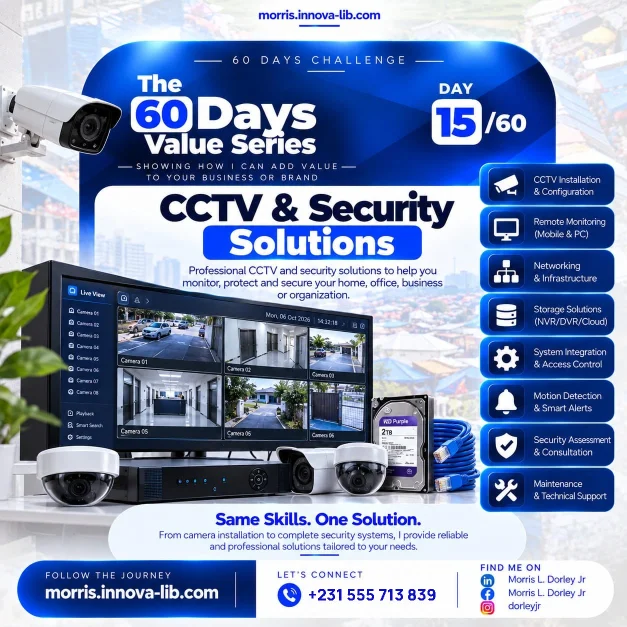

Day 15 of the 60 Days Value Series is about CCTV and security solutions. From camera installation to a complete security system, I provide reliable and professional solutions tailored to your needs, so you can monitor, protect and secure your home, office, business or organization without coordinating several different technicians.
Do you know what is happening at your property right now?
Most people only think about cameras after something goes wrong. A door is forced open, stock goes missing from the store room, a vehicle is damaged in the compound or an argument about what really happened cannot be settled. In that moment, the question is always the same: "Do we have it on camera?"
A good CCTV system answers that question before it is ever asked. It watches the places you cannot be, records what happened, lets you look in from your phone and sends you a message when something moves. It also works quietly in the background as a deterrent, because a visible camera changes how people behave.
This post is for homeowners, shop owners, offices, schools, churches, clinics, warehouses, hotels, estates and organizations who are asking, "How do I protect what I have, and who can set it up properly?" If you are searching for CCTV installation in Liberia or security cameras in Monrovia, this is for you.

Why is a camera not the same as a security system?
Buying a camera is easy. Making a security system that works every day for years is harder. A real system is made of several parts that must work together:
- The cameras. The right type, in the right place, at the right angle, covering the areas that matter.
- The cabling and power. Clean, protected cable runs and stable power, because most failures start here.
- The network. The switches, routers and connections that carry the video from the cameras to the recorder and to your phone.
- The recorder and storage. The NVR, DVR or cloud service that keeps the footage safe and searchable.
- The viewing software. The app and the screens that let you watch live video and search the past.
- The alerts and rules. The motion detection and notifications that tell you when to look.
- The support. Someone who will keep it all running.
When these parts are chosen and installed by different people, nobody owns the whole result. When one person understands the cameras, the network and the software together, the system is planned as one solution from the start.
Footage you cannot find, cannot view remotely or that was never recorded is not security. A complete system records reliably, stores safely and lets you see what you need, when you need it.
What eight services does the Day 15 flyer cover?
The flyer for Day 15 lists eight services. Here is what each one means for your home or business.
1. CCTV installation and configuration
This is the part everyone sees: choosing cameras, mounting them, running the cables and bringing the system online. Configuration is just as important as installation. It covers recording settings, picture quality, time and date, user accounts and passwords, so the system is actually ready to use and not just switched on.
2. Remote monitoring for mobile and PC
Remote monitoring means you are never cut off from your property. From a phone or a computer you can check live video, review recordings and see that everything is in order, whether you are across the city, traveling or simply at home on a Sunday evening. For business owners who manage more than one location, a single view of everything is a real saving of time and travel.
3. Networking and infrastructure
Every modern camera system depends on a network. Poor cabling, an overloaded switch or a weak internet connection will cause dropped video and missing recordings. Because I also work in networking, the same person who installs your cameras designs the network that carries them. This is the same foundation covered on Day 13 on networking and IT infrastructure.
4. Storage solutions: NVR, DVR and cloud
Video takes a lot of space. The storage plan decides how many days of footage you keep and how safe it is. A DVR works with analog cameras, an NVR works with network cameras, and cloud storage adds an off-site copy that survives theft of the equipment itself. I help you choose based on how many cameras you have, how long you want to keep recordings and how much you want to spend.
5. System integration and access control
Cameras are stronger when they work with the rest of your security. Integration and access control means door entry, visitor management and cameras can be planned together, so you can answer not only "what happened?" but also "who entered, and when?"
6. Motion detection and smart alerts
Nobody can watch a screen all day. Motion detection and smart alerts do the watching for you. You choose which areas matter, and the system sends a notification when something moves there. It turns hours of footage into a short list of moments worth checking.
7. Security assessment and consultation
Before buying equipment, it helps to look at the building with fresh eyes. A security assessment walks through your entrances, fences, windows, storage areas, lighting, power and internet. The result is a clear plan: where cameras are needed, which ones to choose and what else is worth fixing. This saves money because you buy only what protects you.
8. Maintenance and technical support
Security is not a one-time purchase. Lenses collect dust, cables get damaged, hard drives age and passwords need to change when staff change. Maintenance and technical support keep the system recording and give you someone to call when something looks wrong.
Who is this service for?
Anyone with something worth protecting can benefit from a properly planned system:
- Homes and estates. Families who want to see the gate, the compound and the street, even when they are away.
- Shops and markets. Retailers who want to protect stock, watch the till area and settle disputes with facts.
- Offices and companies. Businesses that want to protect staff, equipment and records.
- Schools, churches and clinics. Organizations responsible for the safety of many people at once.
- Warehouses and workshops. Places with valuable goods, tools or vehicles that need watching after hours.
- Hotels and guest houses. Hospitality businesses that want to reassure guests and protect shared areas.
Why do many CCTV systems disappoint their owners?
Many people install cameras and later discover they cannot rely on them. The causes are usually avoidable:
- Cameras in the wrong places. They cover the wall instead of the entrance, or face into the sun.
- Poor picture quality. Footage is too dark or too blurry to identify anyone.
- Not enough storage. The drive fills up and the system records only a few days, or stops recording completely.
- Weak networks. Remote viewing is slow or keeps disconnecting.
- Default passwords. Anyone who knows the factory password can potentially access the system.
- No maintenance. Nobody checks the cameras until the day they are needed, and then they are found to be offline.
- Nobody to call. The installer disappears and the owner is left alone with a box of equipment.
A planned system with proper configuration and support addresses each of these from the beginning.
How does one person who does it all save you money?
A typical security project can involve an electrician for the power, a technician for the cameras, a network person for the cabling and someone else for the software. Each person brings a visit, a quote and a share of the blame when something does not work.
With one person, you get:
- One plan. The cameras, the network, the storage and the alerts are designed together.
- One point of contact. You know exactly who to call, and nobody can say it is somebody else's part.
- Less waste. You buy what your property actually needs, not everything a catalogue offers.
- Faster completion. There is no waiting for several people to arrange their schedules.
- Clear costs. One scope and one quote.
This is the idea behind the whole 60 Days Value Series: the same skills, one solution, applied to the part of your business you are looking at today.
How does CCTV connect to the rest of this series?
Security sits on top of several skills that appear throughout this series. The network design comes from the same knowledge as Day 13. Keeping servers, recorders and computers healthy is the work of Day 12 on system administration. Remote viewing on a phone uses the same thinking as the mobile app work from Day 11, and a business that sells online, as in Day 14 on e-commerce, benefits from knowing its premises and stock are protected too.
You can also read the service pages for system administration and IT support and cybersecurity consulting, because physical security and digital security belong together.
How do you know it is time for CCTV?
Look for these signs:
- Something has already gone missing and you could not prove what happened.
- You travel, work late or manage more than one location and cannot be everywhere.
- You have cameras, but you are not sure they are recording or who can see them.
- Staff or visitors come and go and you want a record of entry.
- Your insurance, landlord or organization expects proper security.
- You have seen a neighbor or competitor protect their property better than you protect yours.
- You simply want peace of mind when you go to sleep or leave for the weekend.
If several of these sound familiar, a security assessment is a sensible first step.
What mistakes should you avoid when installing cameras?
- Buying the cheapest equipment without a plan. Low cost becomes expensive when it fails at the wrong moment.
- Skipping the assessment. Cameras placed by guesswork leave blind spots exactly where thieves would walk.
- Ignoring lighting. A camera cannot record what it cannot see at night.
- Leaving default passwords. Change them on every device and keep a record in a safe place.
- Forgetting the power. Without stable power or backup, the system goes dark exactly when it is needed.
- Hiding the recorder in an open place. If the recorder is stolen, so is the evidence.
- Never checking the footage. Test playback regularly so you know it works.
What affects the price of a CCTV system?
There is no single price, because every property is different. The main factors are:
- The number of cameras and the areas you want covered.
- The type and quality of the cameras and the recorder.
- The storage capacity and how long you want to keep recordings.
- The distance of the cable runs and the difficulty of the building.
- Whether you need remote monitoring, motion alerts or access control.
- The amount of ongoing maintenance and support you want.
I would rather give you a clear quote for the right scope than a vague number that changes later. Send me the details and I will explain what is needed and why.
How does it work?
- Tell me about your property. Share what you want to protect, how big the place is and what worries you most.
- Assess and plan. I review the site or your photos and plans, and we agree on camera positions, storage and features.
- Install and configure. Cameras, cabling, network and recorder are installed and set up properly.
- Connect and test. Remote viewing and alerts are set up on your phone and PC, and everything is tested.
- Support and maintain. I keep the system healthy and help you add cameras or features as your needs grow.
Which search terms does this post answer?
If you have searched for any of these, this post was written for you:
- CCTV installation in Liberia
- security cameras in Monrovia
- CCTV technician in Liberia
- remote camera monitoring on phone Liberia
- NVR or DVR setup in Liberia
- access control system for offices
- home security system in Monrovia
- business security solutions for African companies
- how much does CCTV cost in Liberia
- hire a security systems installer in Liberia
Ready to protect what matters?
You do not need one person for the cameras, another for the cables, another for the network and another for the software. You need one capable person who understands how they all fit together and who will stay to look after them. That is what I offer.
Message me on WhatsApp at +231 555 713 839 or use the contact page, tell me what you want to protect, and I will give you a clear plan and a clear quote. Same skills. One solution.
Frequently asked questions
What is included in a CCTV installation?
A complete installation covers choosing the right cameras for each location, mounting them, running and terminating the cables, setting up the recorder, configuring the system and showing you how to use it. I also set up the network behind the cameras, because a camera system is only as reliable as the network it runs on.
Can I watch my cameras from my phone?
Yes. Remote monitoring for mobile and PC lets you view live video and play back recordings from wherever you have an internet connection, whether you are in another part of Monrovia or in another country.
What is the difference between an NVR and a DVR?
A DVR records video from analog cameras, while an NVR records video from network (IP) cameras over your network. Both store the footage on hard drives so you can play it back later. During the security assessment I recommend the type that suits your building, your budget and your plans to expand.
Can the system alert me when something moves?
Yes. Motion detection and smart alerts can notify you when movement is detected in an area you choose, so you do not have to watch the screen all day to know something happened.
Do I need a security assessment first?
It is strongly recommended. A short assessment looks at your entrances, blind spots, lighting, power and internet, and tells us where cameras will actually help. It prevents spending money on cameras that point at the wrong places.
Can CCTV connect to door access control?
Yes. System integration and access control means cameras, door entry and other security parts can be planned to work together, so you can see who entered and when.
What happens if a camera stops working?
Maintenance and technical support are part of the service. Cameras get dirty, cables get damaged and hard drives wear out, so regular checks and quick repairs keep the system recording when you need it most.
How much does CCTV installation cost in Liberia?
The price depends on the number of cameras, the type of cameras and recorder, the storage you want, the cable distances and any access control or remote monitoring features. Send your details on WhatsApp at +231 555 713 839 and I will give you a clear quote for the exact scope.
Do you work with clients outside Monrovia and outside Liberia?
Yes. I work with clients in Monrovia and across Liberia in person, and I can support remote setup, monitoring and troubleshooting for clients across Africa.